

Learning Net Document Mode
Last updated by Ernesto Hidalgo at Mar 08, 2019 11:25 PM
The content you are trying to view is not supported in the current Document Mode of Internet Explorer. Change the Document Mode to Internet Explorer 9 Standards and try to view the content again. To change the Document Mode, press F12, click Document Mode: , and then select Internet Explorer 9 Standards.
Solution
When users receive the following message in the Learning Net,
The content you are trying to view is not supported in the current Document Mode of Internet Explorer. Change the Document Mode to Internet Explorer 9 Standards and try to view the content again.
To change the Document Mode, press F12, click Document Mode: , and then select Internet Explorer 9 Standards.
Please follow the steps below to update the settings:
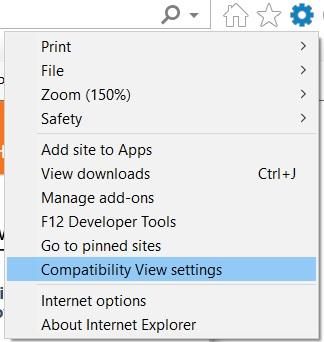
- Open up Internet Explorer and click on the little gear icon
 in the upper right corner
 - Click on Compatibilty View Settings
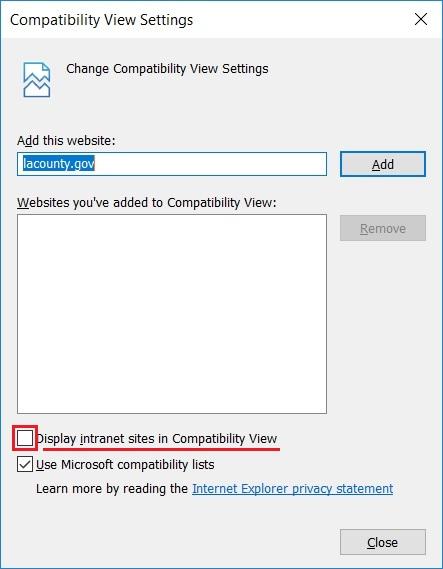
- Uncheck Display intranet sites in Compatibility View and make sure that the learning net or lacounty.gov is NOT listed under Websites you've added to Compatibility View
- Restart Internet Explorer and please try to launch the course once more