
Windows 7 Activation
Last updated by Ernesto Hidalgo at Mar 08, 2019 11:25 PM
Solution
- Remote into user’s PC and open command prompt in Admin mode.
(Note: if the user is logged in, you’ll have to hold down shift and right click CMD then Run as different user and log in with your credentials to open CMD in command prompt)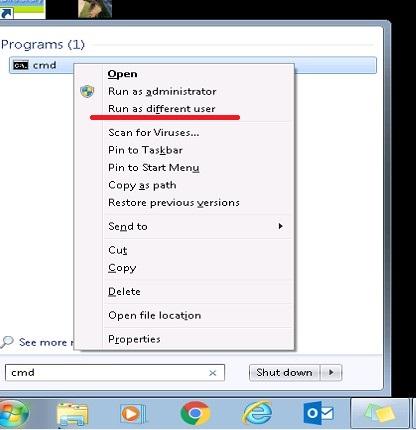
- Input in the following comman into the command prompt
cscript.exe C:\Windows\system32\slmgr.vbs /rearm - Restart computer
- Open CMD again in Admin mode.
- Input in the following comman into the command prompt
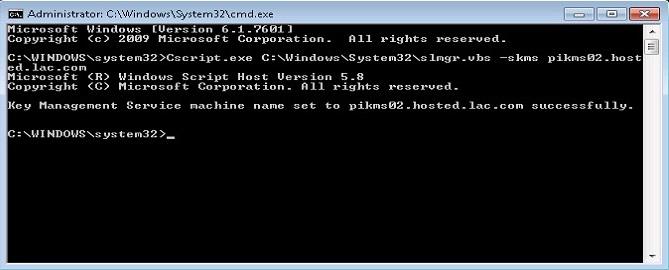
cscript.exe C:\Windows\System32\slmgr.vbs -skms pikms02.hosted.lac.com - It’ll say it’s pointed to the new KMS server (pikms02.hosted.lac.com)
- Input in the following comman into the command prompt
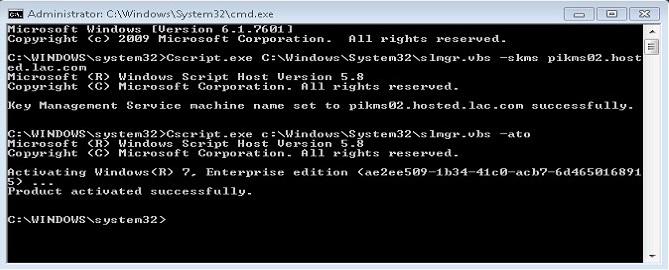
cscript.exe C:\Windows\System32\slmgr.vbs -ato - It’ll say windows has been activated successfully